
Understanding your morning briefing
Every morning at around 6:00 AM Central, PoolHelm reads your whole operation — routes, chemistry, weather, money, loose ends — and writes you the three to five things that actually need a decision. It’s on your Today page, at the top, before anything else.
It is not a feed. It’s short on purpose. If your briefing has five cards, five things need you; it doesn’t have a page two.
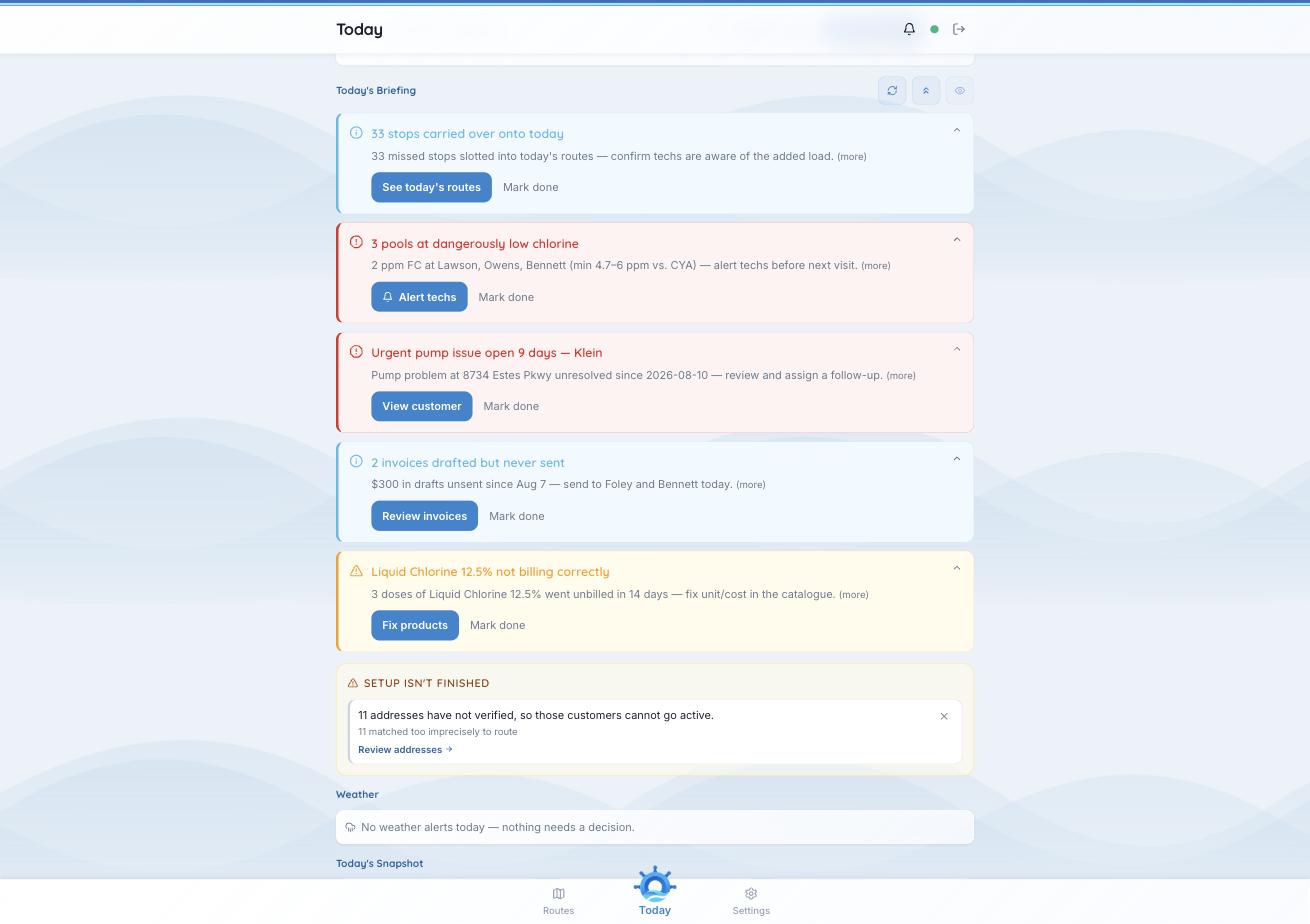
Five cards, each with its evidence and one action — and the setup counter underneath.
What a card is made of
- A headline that states the problem, not the category — “3 pools at dangerously low chlorine”, not “Chemistry.”
- The evidence, in one sentence, with the actual numbers: “2 ppm FC at Lawson, Owens, Bennett (min 4.7–6 ppm vs. CYA) — alert techs before next visit.” You shouldn’t have to go and check whether the card is right.
- An action that takes you where the problem is — Review invoices, See today’s routes, View customer, Alert techs.
- Mark done, for when you’ve handled it.
Reading a card is not resolving it. A card stays until you mark it done or the thing it’s about goes away. That’s deliberate: an alert that vanishes because you glanced at it is an alert you’ll miss on a busy morning.
The kinds of card you’ll see
- Work that moved — carried-over stops landing on today, and whether that overloads someone.
- Chemistry — pools out of range, judged against that pool’s targets rather than one generic set, so a heavily stabilized pool isn’t flagged for a reading that’s fine for it.
- Weather — storms timed against your stops. See “Weather alerts and customer notifications.”
- Money — invoices drafted but never sent, overdue balances, a dispute deadline you can’t afford to miss.
- Things that will cost you quietly — a chemical that can’t be priced and is therefore going unbilled, an urgent issue a tech reported days ago and nobody picked up.
- Setup that isn’t finished — customers who can’t go active yet, with a count and a link.
If a briefing is empty, nothing needed you. That’s a good morning, not a broken feature.
Two settings. Under Settings → AI Preferences you’ll find sections for the briefing’s delivery time, focus and tone marked “More controls coming soon.” The briefing itself works; the knobs to tune it aren’t built. See “AI and weather preferences.”