
How invoicing works
PoolHelm builds invoices from work your techs completed, so what you bill matches what happened at the pool.
What lands on a line
- The visit rate. At the customer’s service level rate. PoolHelm creates this one when a visit is completed.
- Chemicals, if you bill them separately — each one its own line, at your cost plus that product’s markup.
- Anything you add yourself — hourly work, a part, a repair. Add these to the draft before you send it.
Tax. If you charge sales tax, PoolHelm applies your rate to the subtotal and shows it as its own figure. It doesn’t decide what your rate should be — that’s yours to set.
A referral credit is a line too, a negative one. Credits are applied to draft invoices, so the credit lands before the invoice goes out. A credit will never push a bill below zero — the invoice goes to zero and stops there.
The three states
- Draft — created, not sent. You can still change it.
- Sent — emailed to the customer with a link to pay.
- Paid — payment recorded, by card, check, cash, or bank transfer.
The Invoices page
Filter tabs narrow to All, Outstanding, Overdue, Draft, Paid, or Void.
- Draft — Send, Void, Print.
- Sent — Record payment, Resend email, Void, Download PDF, Print, View in Stripe.
- Paid — Download PDF, Print, View in Stripe. A refund shows in red underneath: “Refunded $150.00 on Aug 8.”
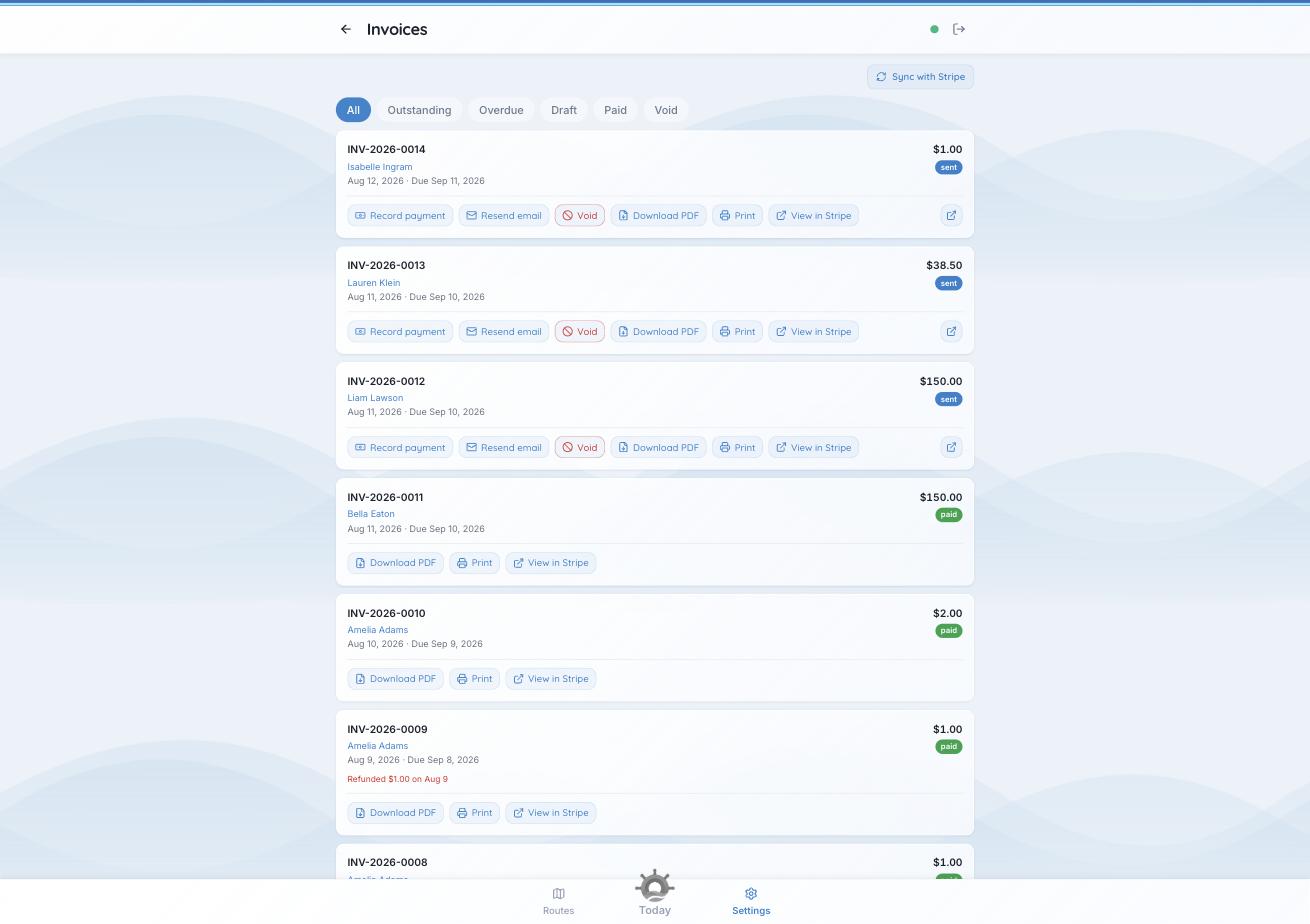
Each invoice carries only the actions that make sense for where it is.
Resend email answers the most common question you’ll get: resend it, and check the customer’s email address while you’re there. Sync with Stripe pulls the latest state on demand, for when you’ve just watched someone pay.
Worth knowing. Auto-send invoices starts off for every customer. No first invoice should go out before you meant it to. Turn it on per customer once you trust the numbers.
See also: “How your billing frequency works” and “How chemicals are billed.”