
Add the chemicals you carry
PoolHelm seeded 18 common products when you created your organization, all switched off, grouped by category: sanitizer, acid, alkalinity, stabilizer, calcium, salt, algaecide, specialty.
Set them up
- Turn on what you actually carry. Anything left off stays out of your techs’ way and out of your dosing.
- Enter your real cost — per gallon, pound, or ounce, whichever the product uses.
- Set a markup. A whole number from 0 to 100.
- Add anything missing with + Add Product in that category.
Read the chip on each row
- Amber BILLS AT COST — no markup set. The customer pays what you paid.
- Green, e.g. 50% → $7.50/gal — marked up, and that’s what the customer pays.
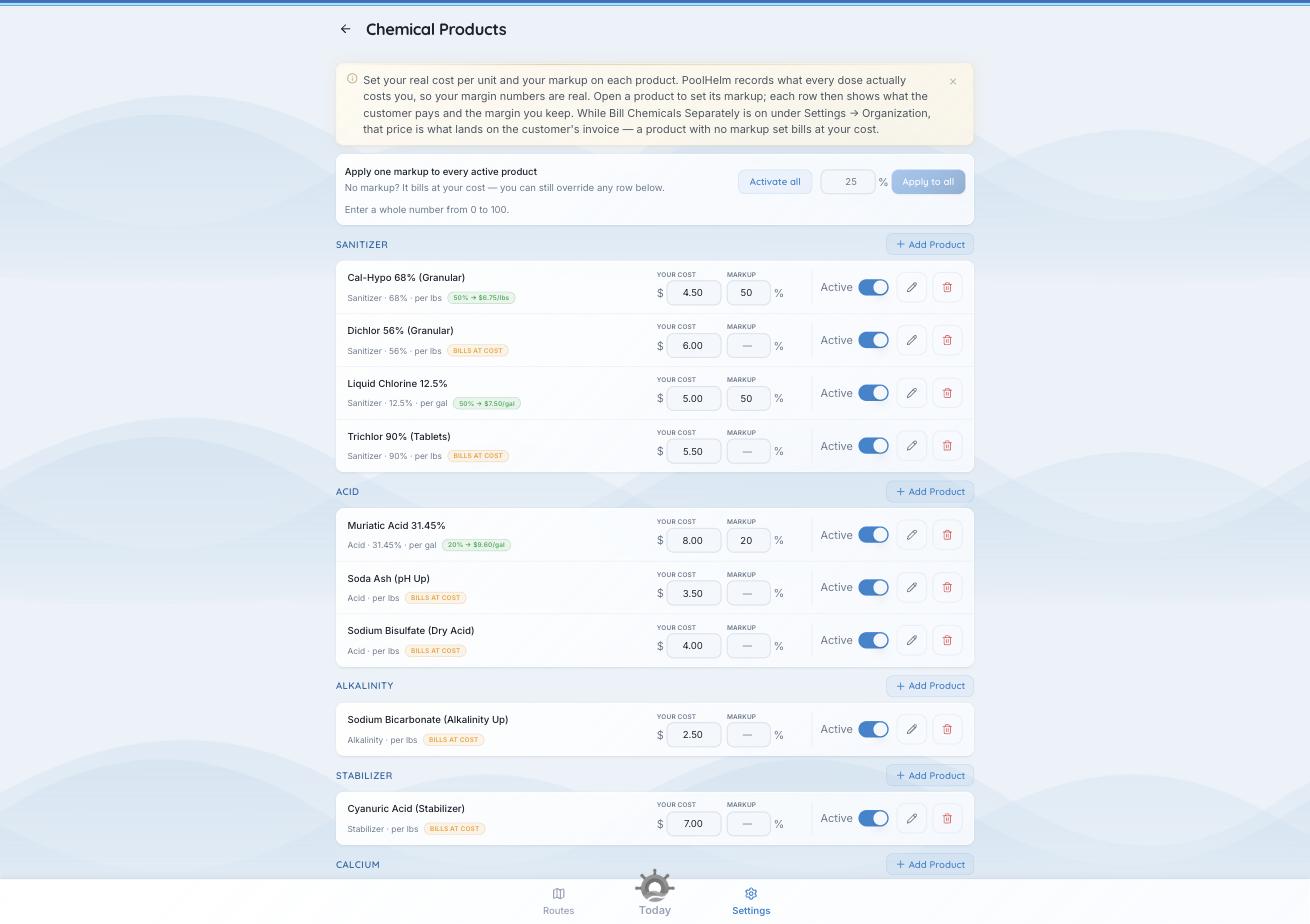
Amber means bill at cost. Green shows what the customer pays.
A blank markup is a decision, not a to-do. It means bill at cost. The amber chip is your reminder.
There’s a bulk bar at the top — apply one markup to every active product — plus Activate all. The fastest way to price a whole catalog, then override the two or three that differ.
Check first. You need at least one sanitizer switched on before you can continue. Chlorine, salt, or bromine — whichever you use. If Continue is greyed out, the reason is written underneath it.
Whether these prices reach the customer’s invoice is a separate switch — see “How chemicals are billed.”